Donation Widget TL;DR:
- A donation widget is a small, embeddable giving component you can add to any page of your website, not just your donation page
- We’ll talk about the top 10 donation widgets worth considering (and whether they’re right for your nonprofit)
- Most donation widgets take minutes to set up with a copy-paste embed code, no developer needed
- Virtuous Raise includes all 10 of these widget types at no added cost for Raise customers
Your nonprofit might have the perfect donation form…fully branded, persuasive copy, and a clean design. But as with most donation pages, there’s only one URL. So, if a donor happens to land on your site but not your giving form, what happens next? Do you have a strategy for that moment? Donation widgets fix this problem by utting a giving opportunity on every page, not just the one.
Instead of hoping a donor finds their way back to your form, you place a floating button, a progress bar, a countdown timer, wherever they already are. The ask travels with them.
So the opportunity to give can be found on your blog, your about page, your programs page…anywhere a donor might be moved to give.
At Virtuous, we sweat the small details, and we work with hundreds of nonprofits like yours. From our experience (and our customers’ experiences), we’ve generated a list of the top 10 donation widgets you can add to your website. Plus, how to add these easily when you use Virtuous Raise.
Let’s get started.
What Is a Donation Widget?
A donation widget is a small, embeddable piece of content you can drop onto any page of your website, not just your dedicated donation page.
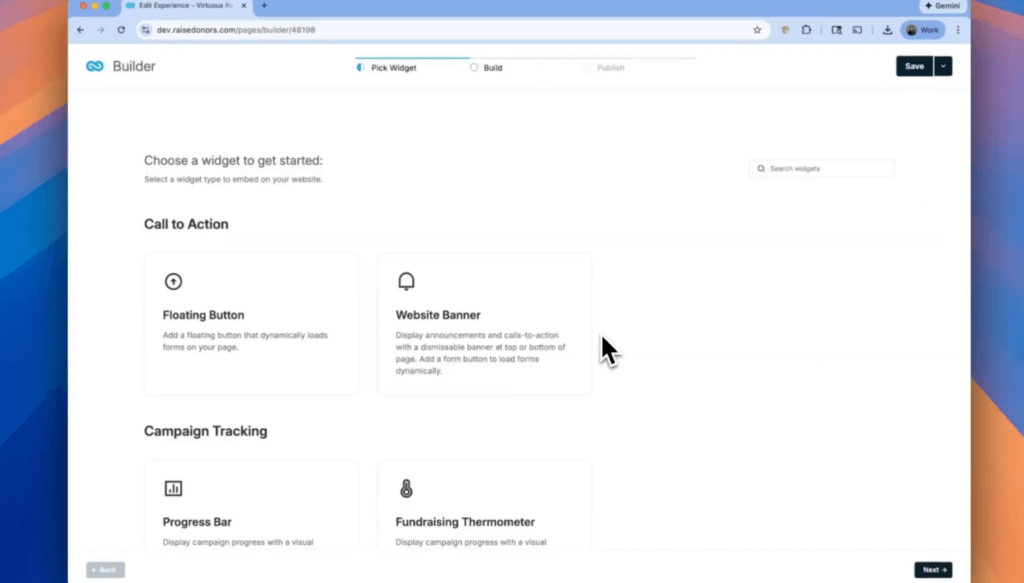
Some examples:
- A floating donate button that follows a visitor down the page.
- A donation thermometer widget that fills up as gifts come in.
- A notification of a recent donor to build the sense of community.
Just a few examples of how donation widgets can function on your donation page.
If you’re using a widget on a sophisticated giving platform, the ideal is that there is no developer required. No rebuilding your donation page. Just a short code snippet, copied and pasted. That’s really the whole idea behind a donation widget: give donors more chances to say yes, without giving your web team more work.
If you want the deeper dive on how Virtuous Raise’s specific widgets work, we cover that in our full widget breakdown.
10 Donation Widgets That Will Transform Your Online Giving Experience
Widgets sit on top of whatever platform is already running your giving, so it’s worth having the right platform underneath them before you start layering widgets on.
Once that’s settled, here are 10 worth building.
1. Floating Donate Button
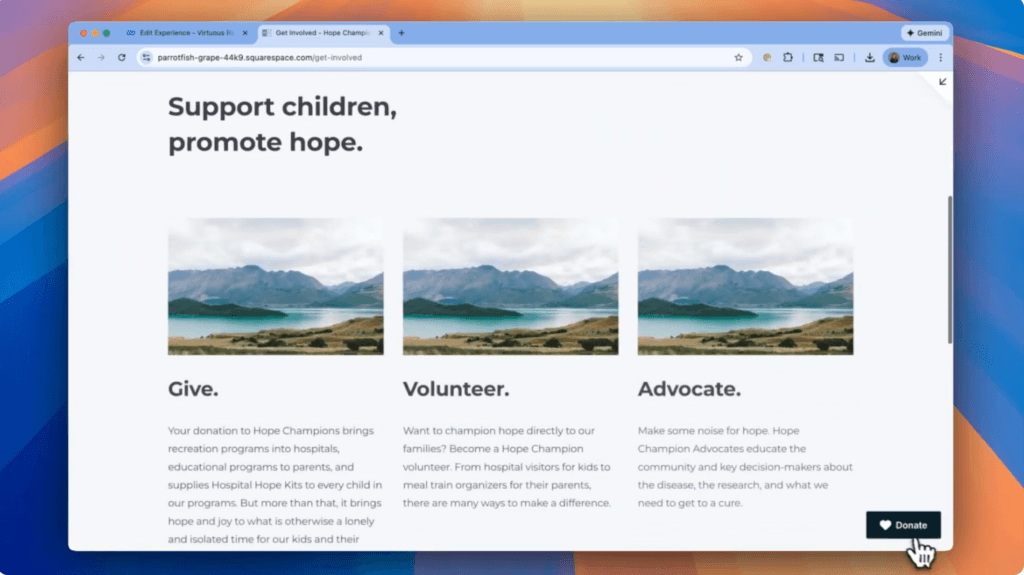
Most donate buttons live on one page. So the moment a visitor feels moved to give while reading a blog post or scrolling your about page, the button they need is nowhere in sight. By the time they go looking for it, the impulse has already cooled off.
What This Donation Widget Does:
The Floating Donate Button docks to the side of any webpage and stays visible as a visitor scrolls, so the option to give travels with them instead of sitting on a single page. In Virtuous Raise, you can set it up as a circular icon, a standard button, or an expandable edge tab that reveals the full button on hover.
Who Should Use This Donation Widget:
Any organization whose visitors spend time browsing content before giving. Think blog-heavy sites, program pages, or annual report pages, where the ask needs to stay close by, no matter where someone lands.
2. Website Banner
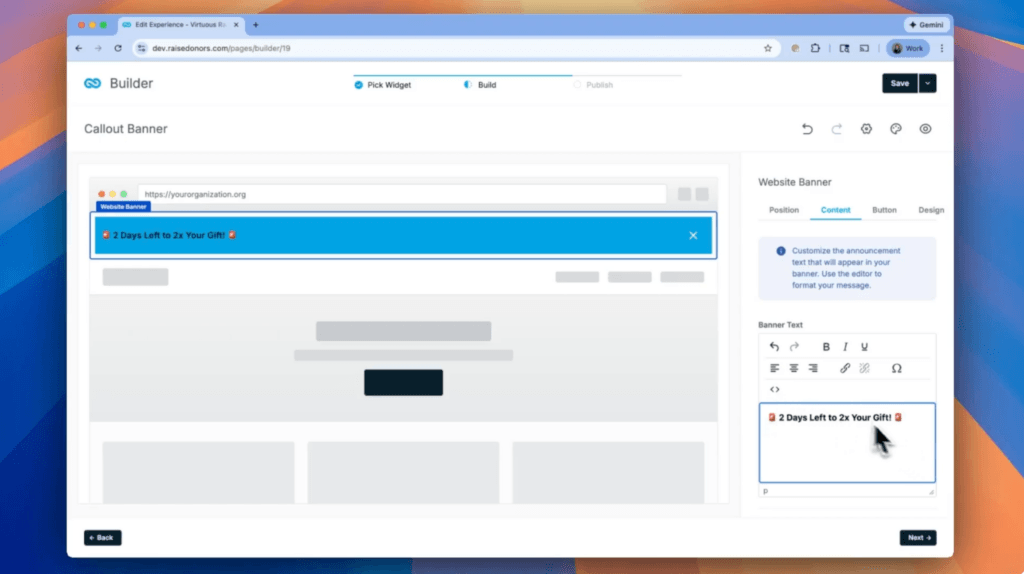
A matching gift deadline. A disaster response. A Giving Tuesday push. None of that lands if your site looks the same as it did last month, and a donor has no way of knowing something time-sensitive is happening at all.
What This Donation Widget Does:
The Website Banner docks to the top of any page and signals that something is happening right now. Virtuous Raise lets you launch one in minutes without waiting on a developer to touch your site’s header.
Who Should Use This Donation Widget:
Teams running short, urgent campaigns, matching gift windows, emergency appeals, or giving days, where the message needs to be impossible to miss the second someone lands on the site.
3. Progress Bar
When a gift goes into your system and nothing on the page changes, a donor has no idea whether they just gave alone or joined a movement. That silence works against you.
What This Donation Widget Does:
This donation widget links to a defined campaign and shows near real-time progress toward your goal as gifts come in, so donors can watch the bar move. Virtuous Raise connects it directly to your campaign data, so it updates on its own as gifts are recorded.
Who Should Use This Donation Widget:
Any organization running a capital campaign, a matching gift challenge, or a time-bound push where momentum itself is part of the pitch.
4. Fundraising Thermometer (Donation Thermometer Widget)
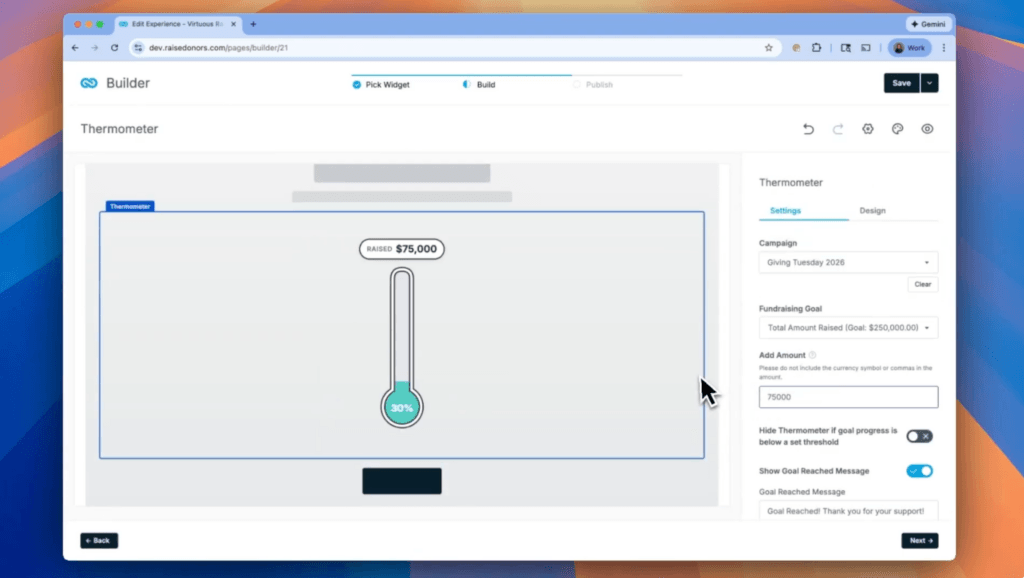
Some donors respond better to a familiar visual than a data bar, especially for annual campaigns where the metaphor of “filling up” toward a goal has decades of recognition behind it.
What This Donation Widget Does:
A donation thermometer widget does the same job as a Progress Bar, just with the classic thermometer graphic fundraisers have leaned on for years. If your team has been searching for a donation thermometer widget you can set up without a developer, Virtuous Raise offers one as a built-in widget type that connects to your campaign and updates automatically as gifts arrive.
Who Should Use This Donation Widget:
Organizations with a legacy or community audience who already associate the thermometer image with giving campaigns, or anyone running a capital or building fund, where the visual metaphor fits naturally.
5. Project Impact
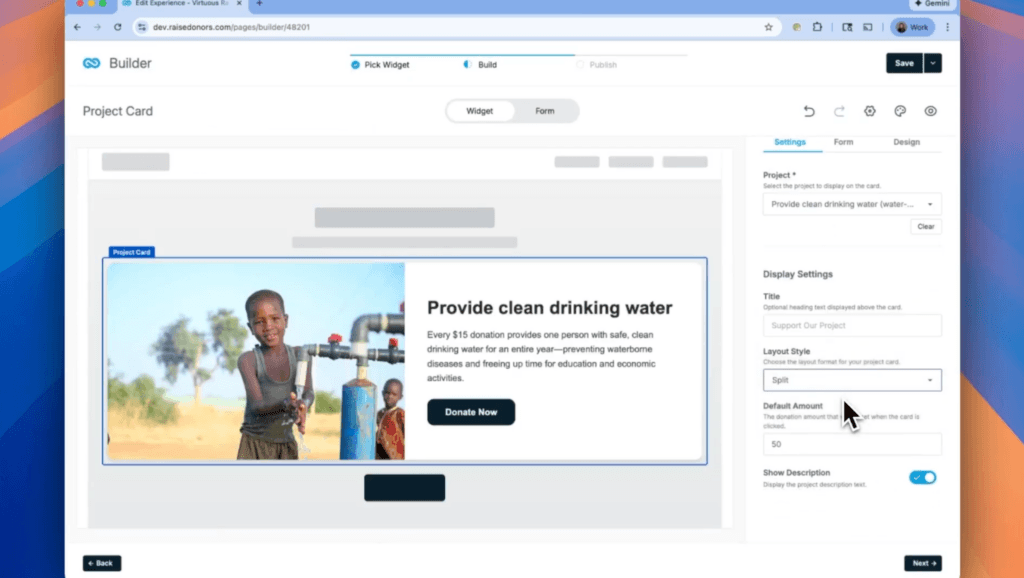
“$50” doesn’t mean much on its own. Without a connection to a real outcome, donors hesitate over the right ask amount, second-guess the number, or default to whatever feels safest.
What This Donation Widget Does:
This donation widget shows donors what a specific gift amount actually does, like “$15 provides clean drinking water to one person for a year.”
Who Should Use This Donation Widget:
Organizations with designated giving programs or specific, describable outcomes, water projects, meal programs, school supplies, where a dollar amount can be tied to something concrete.
6. Project Card
A great project buried three clicks deep never gets funded, not because donors don’t care, but because they never see it in time to act.
What This Donation Widget Does:
This donation widget puts a project image, a short description, and a donate button side by side, right where a donor is already browsing.
Who Should Use This Donation Widget:
Nonprofits running several programs at once that compete for attention, where surfacing one specific project outside the main donation page can pull it out of the noise.
7. Shared Impact
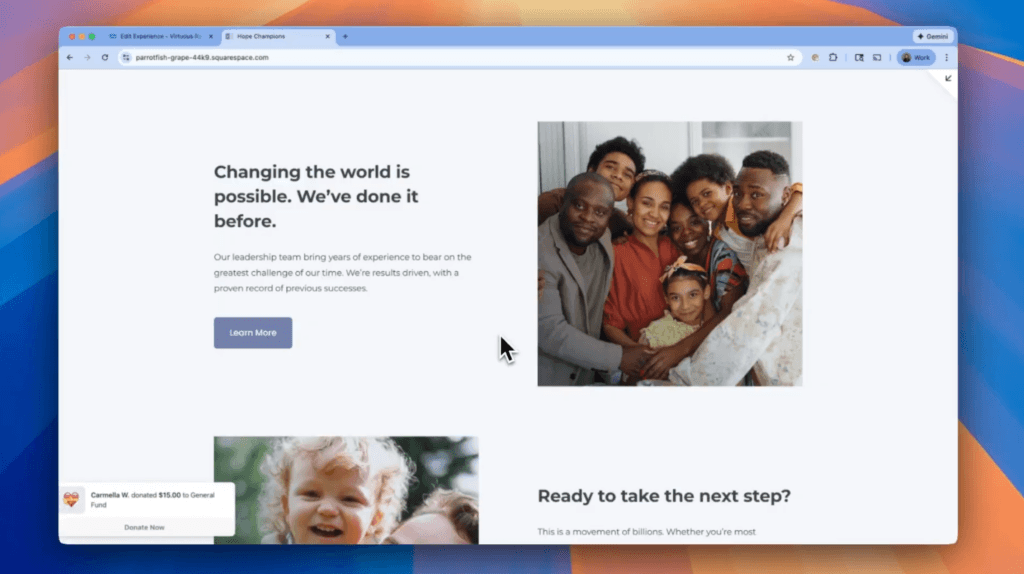
Giving in isolation breeds hesitation. When a donor can’t tell whether anyone else is giving right now, “maybe later” wins more often than it should.
What This Donation Widget Does:
This donation widget solves that with toast notifications, something like “Carol gave $25 to the Clean Water project,” that pop up at irregular intervals as visitors browse. Each one pulls from your most recent gifts and includes its own donate button. Virtuous Raise calls its version Shared Impact, and it draws from your 20 most recent gifts in the platform.
Who Should Use This Donation Widget:
Organizations with a steady stream of smaller, frequent gifts, since this widget depends on having recent activity to show. It works especially well during concentrated giving days.
8. Donor Wall
Generous donors often never see themselves reflected anywhere on your site, which is one of the more overlooked pieces of a solid donor engagement strategy, and potential donors never see proof that real people already trust you with their money.
What This Donation Widget Does:
The Donor Wall shows the names of your recent donors. You can filter it to a specific campaign or leave it open across all of them, and you control how many names show.
Who Should Use This Donation Widget:
Organizations that want to publicly recognize supporters without a formal donor recognition page, or anyone who wants social proof visible on a campaign landing page.
9. Donor Leaderboard
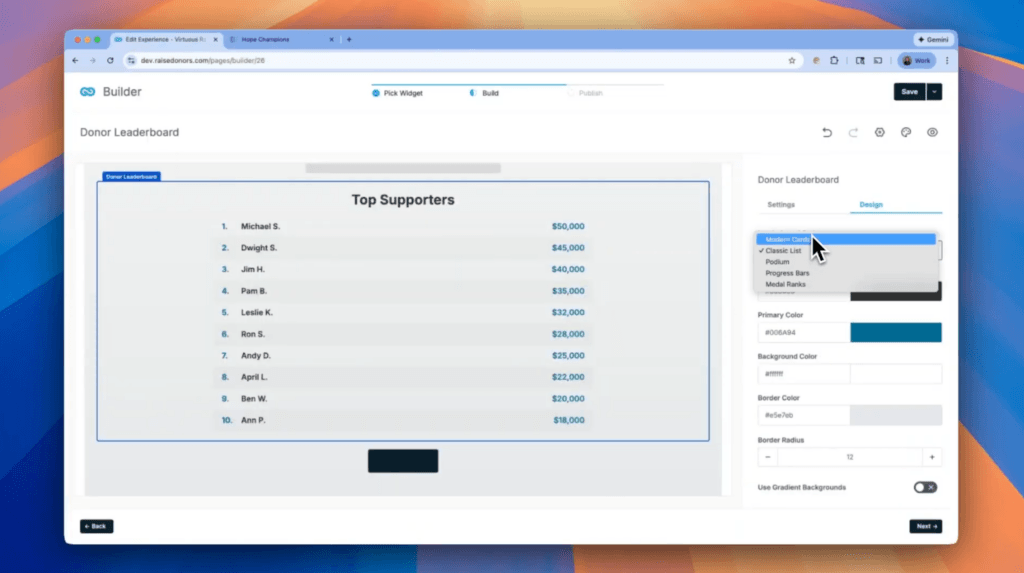
Top donors rarely get public recognition for their generosity, and mid-level donors rarely get a nudge that makes them want to stretch.
What This Donation Widget Does:
Same idea as the Donor Wall, but this donation widget ranks donors by gift amount instead.
Who Should Use This Donation Widget:
Organizations running campaigns with a competitive or peer-to-peer element, where visible rankings motivate bigger gifts rather than feeling exclusionary.
10. Countdown Timer
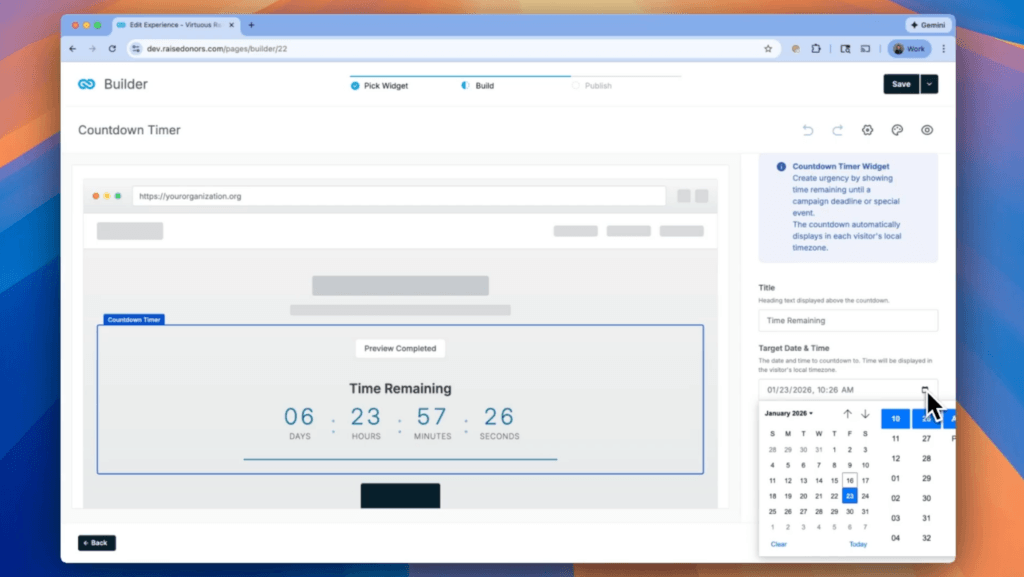
“I’ll do it later” is the most expensive sentence in fundraising. Without a visible deadline, donors put it off, and your campaign quietly expires with no one noticing time ran out.
What This Donation Widget Does:
This donation widget puts a simple, ticking deadline anywhere on your site. It pairs especially well with a matching gift window or a year-end push, and it’s one of the more straightforward widgets to set up in Raise.
Who Should Use This Donation Widget:
Any organization with a real deadline, matching gift windows, year-end tax deadlines, event registration cutoffs, where urgency is genuine and not manufactured for effect.
All 10 of these widgets are already built into Virtuous Raise, included at no extra cost for every Raise customer.
If you’re ready to see them in action, get a Raise demo and we’ll walk through how they’d fit on your site.
Or you can watch the video below, where we step through our donation widgets.
How to Add a Donation Widget to Your Website
The exact steps vary by platform, but here’s what setting one up looks like in Virtuous Raise:
- Go to the Experiences tab. This is the same place you already create and manage donation forms.
- Create a new Experience and select Widgets. Choose which of the 10 donation widget types you want.
- Configure the widget. Every widget has a Design tab where you set colors, text, and icon styling to match your brand. Some widgets have their own layout options on top of that (the Floating Donate Button’s icon vs. tab style, for example).
- Connect it to data, if needed. Campaign Tracking widgets need a campaign already set up. Project widgets need a project. Social Proof widgets need existing gift history to show anything meaningful.
- Use basic mode if you need a form fast. For any widget with a donate button (Floating Button, Website Banner, Project Impact, Project Card, Shared Impact), basic mode lets you build a working donation form right inside the widget setup using toggles: payment gateway, recurring gifts, PayPal, anonymous giving, tributes, and a few more. No need to pre-build a form and select it from a dropdown.
- Save and publish. Copy the embed code generated and paste it into your website. If you can edit your site’s HTML, you’re done.
Every donation widget built in Raise is included at no additional cost. No upgrade tier. No add-on fee.
More Donation Page Resources
Want to keep going? Here’s related reading on donation pages, forms, and platforms:
- What Makes a High-Converting Donation Page
- The Best Donation Platforms for Nonprofits
- How AI Is Changing Donation Forms
Stop Losing Gifts to a Single Page
Every day your website routes every donor to one donation page, you’re losing gifts to distraction, friction, and “I’ll come back later.”
A donation widget fixes that by putting the ask where the attention already is, not just where your nav bar points. If you’re on Virtuous Raise, all 10 of these widget types are already available to you in the Experiences tab.
If you’re not, get a Virtuous Raise demo to see how widgets fit into the rest of the platform.
Donation Widget FAQs
What is a donation widget?
A donation widget is a small, embeddable component, like a button, thermometer, or donor list, that you can add to any page of your website to create a giving opportunity outside of your main donation page.
How do I add a donation widget to my website?
Most platforms generate a short embed code once you’ve configured the widget. You copy that code and paste it into your website wherever you want the widget to appear. In Virtuous Raise, this happens from the Experiences tab.
Do I need a developer to add a donation widget?
No, in most cases. If you can edit your website’s HTML to paste in a code snippet, you can add a donation widget yourself. Raise widgets, for example, are designed to be embedded without any developer involvement.
Are donation widgets free to use?
It depends on the platform. Some charge extra for widget features or gate them behind a higher plan. Raise includes all 10 of its widget types for every Raise customer at no additional cost.
Can I add more than one donation widget to the same page?
Yes, there’s typically no limit to how many widgets you can place on a single page. That said, too many competing for attention can hurt rather than help, so it’s worth being deliberate about which ones you combine.
Will a donation widget slow down my website?
Well-built donation widgets are designed to load asynchronously, meaning they shouldn’t meaningfully affect your page load time. If you’re stacking several resource-heavy widgets on one page, it’s worth testing your specific setup.
What’s the difference between a donation widget and a donation form?
A donation form is typically the full checkout experience, where a donor enters their payment details and completes a gift. A donation widget is often smaller and more targeted, like a button or a thermometer, and it may launch a form, link to one, or simply display information (like progress toward a goal) without collecting a gift directly.
Do social proof donation widgets show real donations?
It depends on the widget. Some, like Raise’s Shared Impact, pull from your organization’s actual recent gift data rather than generating fake activity. It’s worth confirming how any widget you consider sources its data before adding it to your site.
Which donation widget works best for a year-end campaign?
A combination tends to work better than any single widget. Pairing a countdown timer with a progress bar or thermometer gives donors both urgency and visible momentum toward your goal.